> tutorial · build it yourself · sv cloud
A live Bangkok flood map, built by AI in 3 hours. Here is how to make one.
Every heavy rain brings the same two questions: where is it flooded, and which way should I go? We had AI build a map that answers both on one phone screen. No human wrote a single line of code, and this article shows you how to do the same by pasting one prompt into Claude.
What the app does
It opens on any phone, no install. It pulls real flood reports from Traffy Fondue (Bangkok's public complaint app), Longdo, the city's road water sensors and canal water stations onto one satellite map. Then AI reads each Thai report to work out how deep the water is, whether it is rising or falling, and how far to trust it.
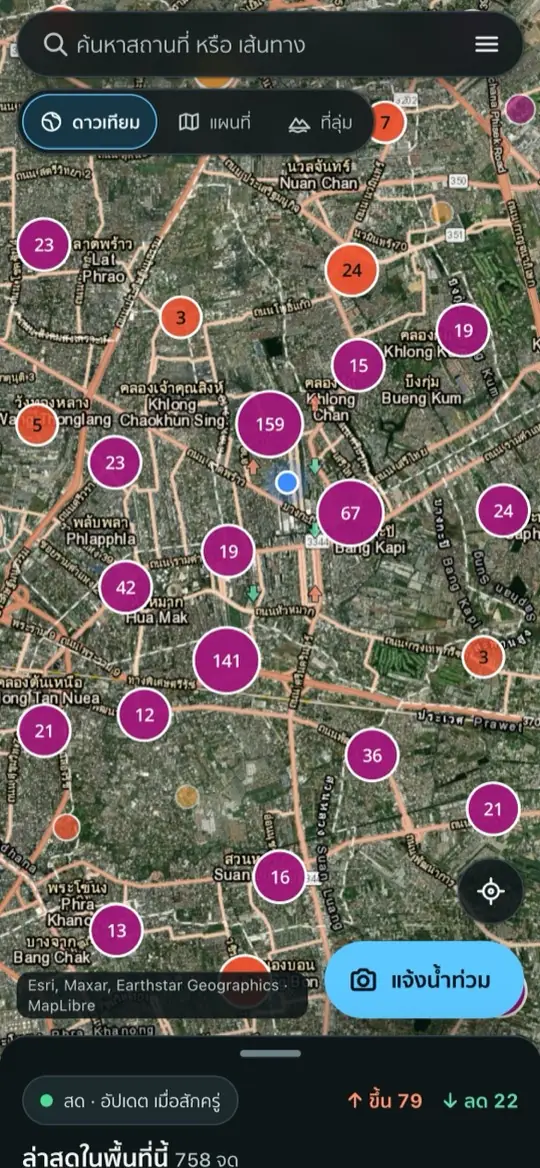
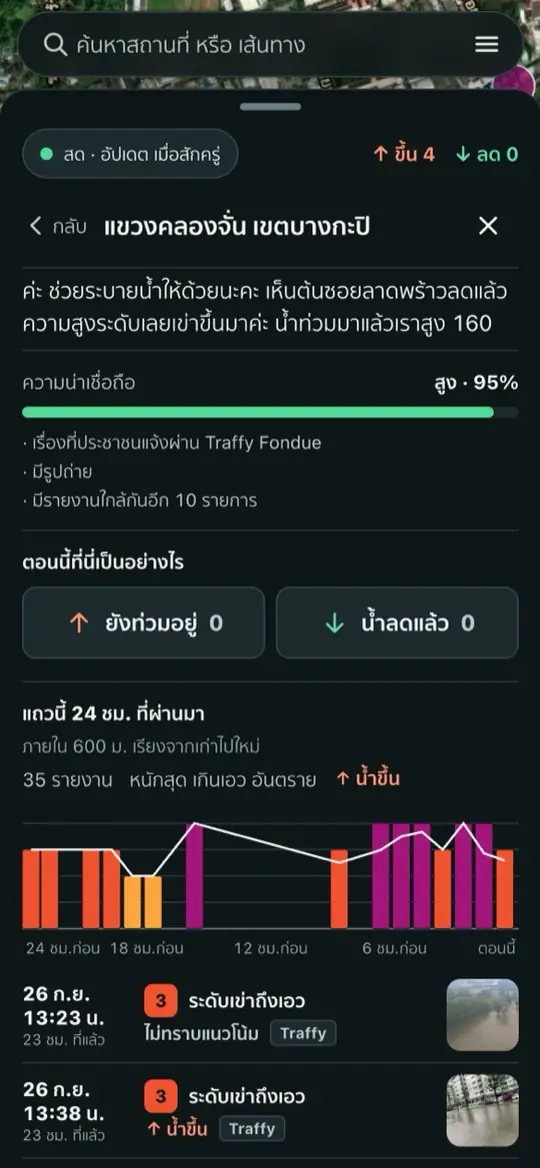
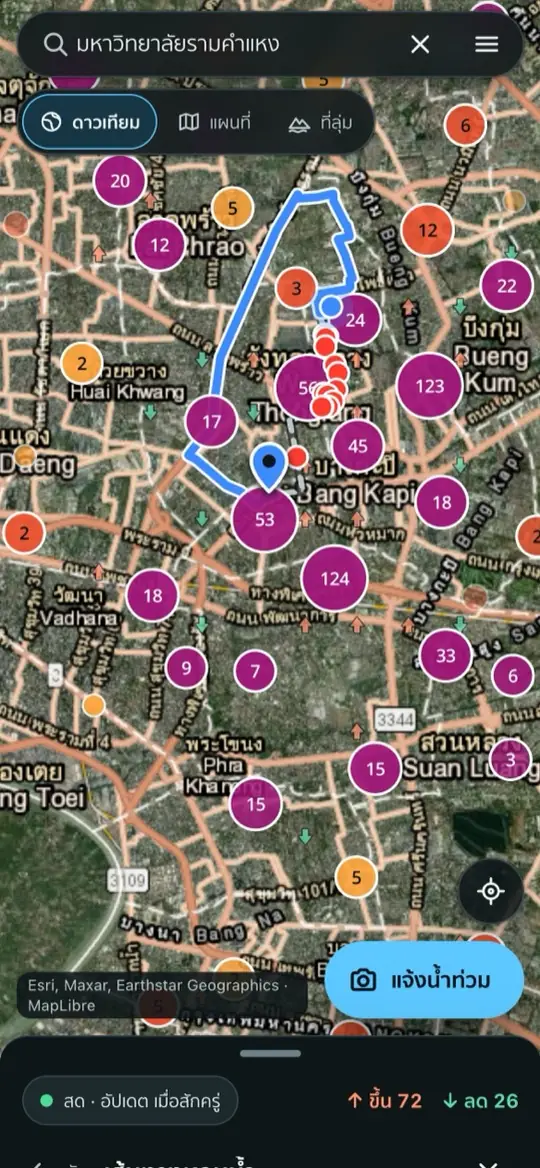
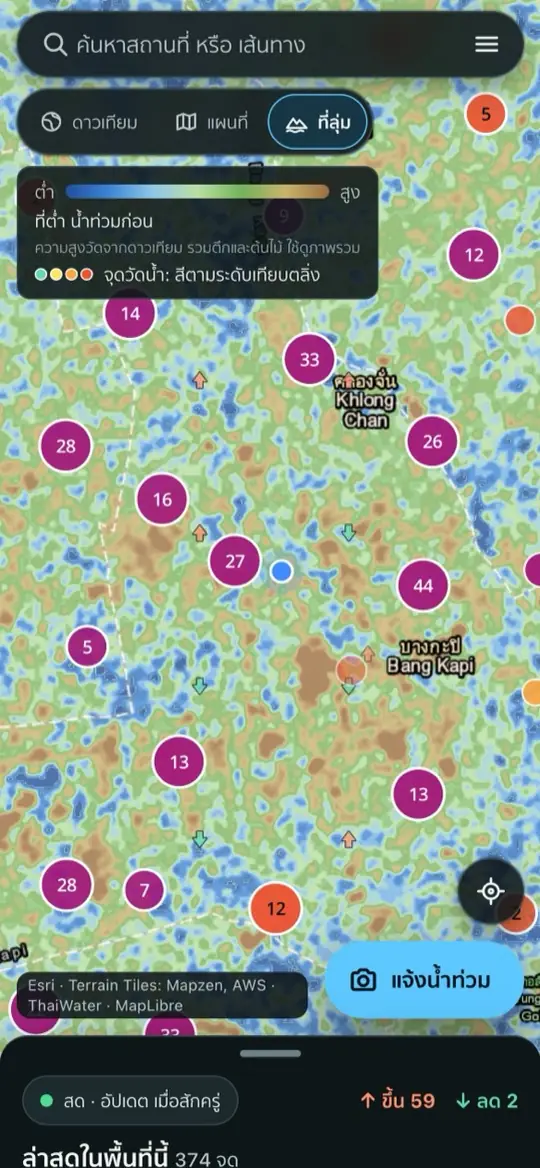
- Live map that refreshes itself every few minutes
- Real photos, real depth: ankle, knee, waist, with the time the water was seen
- 24-hour timeline for each area, so you can see if the water is rising or falling
- Flood-avoiding routes: search a place and the app steers you around flooded spots
- Low-ground map: low areas flood first, and you can see it at a glance
- Report a flood in 4 steps with a photo or video, no sign-up
See it in 45 seconds
3 hours, no human touching the code
The owner did one thing: told the AI, in plain words, what they wanted. The AI (Claude) did everything else: wrote the code, wrote the tests, put it online, opened the live site to check its own work, and fixed its own bugs. Here is the real timeline, the morning of 27 Sep 2026, Bangkok time:
- 07:57SV Cloud has the app's home ready: code storage, database, file storage and a live web address. The AI starts.
- 09:16First version done: map, report feeds, AI reading, phone layout
- 09:31First time live on the web, with 459 flood reports on the map
- 10:26Added the city's road water sensors, refreshed every 10 minutes
- 11:04Flood-avoiding routes, low-ground map, timelines and junk filtering all live, after 25 rounds of changes
Why so fast: SV Cloud is a cloud the AI knows how to use
The slowest part of making an app is usually not writing the code. It is getting the app online: setting up a server, connecting a database, storing secret keys, fixing it when it breaks. That is where AI usually gets stuck and waits for a person to click things.
SV Cloud is built so the AI can do those steps on its own from day one. It is made by a Thai team:
- Create a project, get a live site. A web address, a database and file storage come already connected. Nothing else to sign up for.
- Every project ships with a manual for the AI. The AI reads it and knows how to publish, how to use the database, and what never to do.
- One command publishes. Changes are live in minutes, and if a test fails the change is blocked, so the site people are using never breaks.
- The AI can read the logs and status itself. It sees what broke and fixes it. Nobody has to copy error messages back and forth.
Follow along in 5 steps
No coding needed. It takes about 30 minutes of your own time; the rest is waiting for the AI.
Get 3 things ready
Claude on a Pro or Max plan (Claude Code in the Claude desktop app works best), a free GitHub account (where the code lives), and a host for the website (see the next step).
Pick a host
With SV Cloud: it is still in alpha and free to use, so join the waitlist at cloud.sv-academy.org. Once you are in, create a new project and name it. You get a GitHub code repository and a live web address right away. Using another host? Skip to step 3; Claude will walk you through the setup.
Open Claude in your project folder
In the Claude app, open the Code tab and pick your project folder (or a new empty one). With SV Cloud, tell Claude: "Clone my SV Cloud project from GitHub and install svcloud for me."
Copy the prompt below into Claude
Change the first line to match your host, then send. Claude plans, builds and publishes on its own.
Answer Claude's questions, then try it on your phone
Claude only stops for a few things, like an API key (a password that lets your app use an outside service), and it tells you where to get one. When it is done, open the link on your phone. If something is off, just say so in plain words: "the buttons are too small" or "show floods near my home first".
The prompt for Claude (copy all of it)
This is a summary of what we actually asked the AI for when building this map, with the real data sources.
My host: SV Cloud   (change to Vercel or Railway if you use those)

Build a web app called "Bangkok Live Flood Map", finish it and put it online. I am not a programmer, so explain things in simple words.

Before you start:
- If the host is SV Cloud: read SVAGENTS.md in this folder first and follow every rule in it. Publish by pushing to main.
- If the host is Vercel or Railway: create the project, connect a Postgres database, and tell me step by step what to click.

What the app must do:
1. A satellite map of Bangkok showing flood spots from real reports, refreshed automatically every few minutes, from these sources:
   - Traffy Fondue: publicapi.traffy.in.th (flood complaints)
   - Longdo Traffic: event.longdo.com/feed/json
   - Bangkok city road water sensors: now.bangkok.go.th/flood-alert.html
   - Canal water levels and rainfall: api-v3.thaiwater.net
2. Each spot shows the water depth (ankle, knee, waist), a photo if there is one, when the water was seen, and whether it is rising or falling.
3. Use Claude to read each Thai report: work out the depth and the trend, give it a trust score, and filter out junk. Use a small, cheap model for most of it.
4. Tap an area to see a 24-hour timeline for it, ordered by when the water was actually seen.
5. A place search, and a route button that goes around flooded spots.
6. A "low ground" map showing land height, so people can see why some places flood first.
7. A "Report a flood" button: report with a photo or video in 4 steps, shrink files before upload, remove GPS location from photos, no sign-up (just pick a nickname the first time).
8. Phone first, works on iPhone and Android. Thai by default with an English switch. Little text, little scrolling, one page.

How to work:
- Work in small pieces. Publish each finished piece to the live site right away, then open the live site and check it really works.
- Write tests for every feature. If a test fails, do not publish.
- If you need an API key, stop and ask me, tell me where to get it, and never put keys in the code (for example an Anthropic API key so the AI can read reports, and a free OpenRouteService key for routes).
- If one data source is down, the app must keep working with the others.
- Each time you finish something, send me a phone-size screenshot.
- You are done when you send me a link that really works on my phone.
Which host should you pick?
The prompt works anywhere: just tell Claude which host you use. The difference is how much you have to set up yourself.
SV Cloud what we used
A cloud the AI knows how to use from the start, made by a Thai team. Website, database and file storage in one go, and the AI can publish and troubleshoot on its own. Still in alpha: join the waitlist to use it free.
Join the waitlist ↗Vercel
Very popular for websites. Connect GitHub and every change goes live automatically. Has a free plan. The database comes from a partner such as Neon or Supabase, and you set up the secret keys yourself.
vercel.com ↗Railway
Runs almost any kind of server. Add a Postgres database in one click. You pay for what you use, with trial credit to start.
railway.com ↗Other options
Cloudflare, Render and Netlify work too. Not sure? Ask Claude: "where should I host this app?"
If you get stuck
- No data on the map: ask Claude "which data source is failing, and why?" Some sources go down for maintenance now and then.
- Routes do not work: free routing services limit how often you can call them. Ask Claude to add a backup, or use your own API key.
- The app cannot find your location: check that your phone's browser is allowed to use location (iPhone: Settings > Privacy > Location Services).
- Anything else: tell Claude what you see on screen, attach a screenshot, and let it fix it.
All the data sources are public. If you plan to use them commercially, read each source's terms of use first.
> sv cloud · the ai-native cloud, made in thailand
An idea this morning. A live website before lunch.
SV Cloud lets AI build, publish and look after your app on its own from day one. No servers to set up, no database to wire up. It is still in alpha and free to use: join the waitlist and we will send your invite when it is ready.