Get found by Google, Bing and the AI enginesให้ Google, Bing และ AI หาเว็บคุณเจอ
Your page is live. Now make it readable to the machines that send you customers: search engines, and the assistants people ask instead of searching. Six steps, about 40 minutes. Claude does the code, you press the buttons. เว็บคุณออนไลน์แล้ว ขั้นต่อไปคือทำให้ "เครื่อง" อ่านเว็บคุณออก ทั้ง search engine และ AI ที่คนเริ่มถามแทนการ search มี 6 ขั้น ใช้เวลาราว 40 นาที Claude เขียนโค้ดให้ คุณแค่กดปุ่มตาม
People, and machines. The machines decide whether people ever hear about you.คน กับ เครื่อง และเครื่องเป็นตัวตัดสินว่าคนจะได้เจอคุณหรือไม่
Microsoft says Copilot asks the Bing search service when it needs the web. In our own experience almost no Thai business has submitted to Bing at all.Microsoft บอกเองว่า Copilot ไปถาม Bing เวลาต้องการข้อมูลจากเว็บ เท่าที่เราเห็น ธุรกิจไทยแทบไม่มีใคร submit เว็บเข้า Bing เลย นี่คือข้อได้เปรียบ
Same true facts in three formats. Never a fact that is not on your page.ข้อมูลจริงชุดเดียว เขียน 3 รูปแบบ ห้ามแต่งข้อมูลที่ไม่มีจริงในหน้าเว็บเด็ดขาด
Let Claude prepare your siteให้ Claude เตรียมเว็บให้พร้อม
Using Codex instead of Claude Code? Every prompt here works there too. Where this page says Claude, read it as your coding agent.ใช้ Codex แทน Claude Code? ทุก prompt ในหน้านี้ใช้ได้เหมือนกัน ตรงไหนที่เขียนว่า Claude ให้อ่านว่า coding agent ของคุณ
Paste this once. Claude adds the title and description, the social preview, a structured facts block (JSON-LD), and three small files that crawlers look for: robots.txt, sitemap.xml and llms.txt.
วาง prompt นี้ครั้งเดียว Claude จะใส่ title กับ description, ภาพ preview ตอนแชร์ลิงก์, ก้อนข้อมูลที่เครื่องอ่านออก (JSON-LD) และไฟล์เล็กๆ 3 ไฟล์ที่ crawler มองหา คือ robots.txt, sitemap.xml และ llms.txt
A short text file at the top of your site saying which parts a crawler may fetch. Search engines and AI crawlers read it first. It is not a lock: it asks, it does not hide a page, and it applies only to your own address, so sv-academy.org's robots.txt does nothing for you. ไฟล์ข้อความสั้นๆ ที่วางไว้ตรง root ของเว็บ บอกว่า crawler เข้าส่วนไหนได้บ้าง search engine และ AI crawler อ่านไฟล์นี้ก่อนเสมอ แต่ไม่ใช่ตัวล็อก เป็นแค่การขอความร่วมมือ ไม่ได้ซ่อนหน้าเว็บ และมีผลเฉพาะกับที่อยู่ของคุณเอง robots.txt ของ sv-academy.org จึงไม่เกี่ยวกับเว็บคุณ
A list of every page you want found, written in XML so a machine reads it in one go. Google and Bing use it to discover pages instead of guessing from links. It promises nothing: it is a map, not a queue ticket. Every address inside it must be your own. รายการหน้าเว็บที่คุณอยากให้คนเจอ เขียนเป็น XML ให้เครื่องอ่านได้รวดเดียวจบ Google และ Bing ใช้ไฟล์นี้หาหน้าเว็บ แทนที่จะเดาเอาจากลิงก์ แต่ไม่ได้รับประกันอะไร เป็นแผนที่ ไม่ใช่บัตรคิว และทุกที่อยู่ข้างในต้องเป็นของคุณเอง
A plain summary of your business for AI assistants, written in Markdown. It is a proposal, not a web standard like the other two: AI companies publish one for their own documentation, nobody promises to read yours, and Google does not document reading it. We add it because it costs nothing. สรุปธุรกิจของคุณแบบอ่านง่าย เขียนเป็น Markdown ให้ AI assistant อ่าน ตัวนี้ยังเป็นแค่ข้อเสนอ (proposal) ยังไม่ใช่มาตรฐานของเว็บเหมือน 2 ไฟล์แรก บริษัท AI ทำไฟล์นี้ไว้ให้เอกสารของตัวเอง แต่ไม่มีใครรับปากว่าจะอ่านของคุณ และ Google ก็ไม่เคยบอกว่าตัวเองอ่านไฟล์นี้ เราใส่ไว้เพราะไม่ได้เสียอะไร
ChatGPT is handled here, not in the Bing step. OpenAI says a site becomes eligible for ChatGPT search when its crawler OAI-SearchBot is allowed, which your robots.txt does, and when the site's host or CDN also lets OpenAI's published searchbot addresses through, which is the platform's side, not yours.
ส่วน ChatGPT อยู่ตรงนี้ ไม่ใช่ที่ขั้น Bing OpenAI บอกว่าถ้าอยากให้เว็บมีสิทธิ์ขึ้นใน ChatGPT search ต้องอนุญาต crawler ชื่อ OAI-SearchBot ซึ่ง robots.txt ที่ Claude เพิ่งสร้างก็อนุญาตไว้ให้แล้ว และ host หรือ CDN ของเว็บต้องเปิดให้ IP ของ searchbot ของ OpenAI เข้าได้ด้วย ส่วนนี้เป็นฝั่งแพลตฟอร์ม ไม่ใช่ของคุณ
When Claude says it has deployed, open these three and look at how each one starts.พอ Claude บอกว่า deploy แล้ว ให้เปิด 3 ลิงก์นี้ แล้วดูว่าแต่ละไฟล์ขึ้นต้นด้วยอะไร
robots.txthas a line starting withSitemap:followed by your own address.ต้องมีบรรทัดที่ขึ้นต้นด้วยSitemap:ตามด้วยที่อยู่เว็บของคุณเองsitemap.xmlstarts with<?xml, and every address inside it is yours.ต้องขึ้นต้นด้วย<?xmlและทุกที่อยู่ข้างในเป็นที่อยู่ของคุณllms.txtstarts with#and your business name.ต้องขึ้นต้นด้วย#ตามด้วยชื่อธุรกิจของคุณ
If all three show the same sentence instead, Your app is provisioning. Push to deploy., your site has not deployed yet and nothing below will work. Wait a few minutes and open them again. If you see {"error":"Not found"} instead, your site is live but the three routes are missing: give Prompt 1 to Claude again and let it deploy.
แต่ถ้าทั้ง 3 ไฟล์ขึ้นข้อความเดียวกันว่า Your app is provisioning. Push to deploy. แปลว่าเว็บยังไม่ได้ deploy ขั้นต่อไปจะทำไม่ได้ ให้รอสัก 2-3 นาที แล้วเปิดใหม่ ถ้าขึ้นว่า {"error":"Not found"} แปลว่าเว็บ deploy แล้ว แต่ยังไม่มี 3 route นี้ ให้ส่ง Prompt 1 ให้ Claude อีกครั้งแล้ว deploy ใหม่
Tell Google you own the siteบอก Google ว่าเว็บนี้เป็นของคุณ
Always choose URL prefix. It is the one property type you can prove from your own page, so Claude can do the proving for you: you copy one tag, Claude puts it on your site and deploys, you press Verify. Domain needs a DNS record, which neither you nor Claude can add here.เลือก URL prefix เสมอ เป็นแบบเดียวที่พิสูจน์ได้จากหน้าเว็บของคุณเอง Claude จึงทำส่วนนี้แทนคุณได้ คุณแค่ copy tag มาหนึ่งบรรทัด Claude ใส่ลงเว็บแล้ว deploy ให้ จากนั้นคุณกด Verify ส่วนแบบ Domain ต้องเพิ่ม DNS record ซึ่งทั้งคุณและ Claude เพิ่มตรงนี้ไม่ได้
Your address sits under sv-academy.org, a domain the school owns, and that is fine. The right hand box, URL prefix, with the HTML tag method, only asks you to prove you can edit your own page, which you can. The left box, Domain, needs a DNS record on sv-academy.org, which belongs to the school. ที่อยู่เว็บคุณอยู่ภายใต้โดเมน sv-academy.org ของโรงเรียน ซึ่งไม่เป็นปัญหา กล่องขวา URL prefix คู่กับวิธี HTML tag ขอแค่ให้คุณพิสูจน์ว่าแก้หน้าเว็บของตัวเองได้ ซึ่งคุณทำได้อยู่แล้ว ส่วนกล่องซ้าย Domain ต้องใส่ DNS record ของ sv-academy.org ซึ่งเป็นของโรงเรียน
One thing to know rather than to do: whoever holds a Domain property for sv-academy.org sees the numbers for every address under it, yours included, and does not need your account to add it. Your own property never shows you anything of theirs. เรื่องที่ควรรู้ไว้ ไม่ต้องทำอะไร ใครที่ถือ Domain property ของ sv-academy.org จะเห็นตัวเลขของทุกที่อยู่ภายใต้โดเมนนั้น รวมถึงของคุณ และไม่ต้องใช้ account ของคุณ ส่วน property ของคุณไม่ทำให้คุณเห็นอะไรของเขา
- Sign in with your own Google account, the one you will keep using for this site.Sign in ด้วย Google account ของคุณเอง อันที่จะใช้กับเว็บนี้ต่อไป
- You see two boxes. Use the right one, URL prefix. Paste your address exactly as this page shows it, with
https://in front and/at the end, then press Continue.จะเห็น 2 กล่อง ให้ใช้ กล่องขวา URL prefix วางที่อยู่เว็บให้ตรงกับที่แสดงบนหน้านี้ คือมีhttps://นำหน้า และมี/ปิดท้าย แล้วกด Continue
https:// in front and / at the end.หน้าจอจริง กล่องขวาที่มีเลข 2 วางที่อยู่เว็บของคุณลงไป โดยมี https:// นำหน้า และ / ปิดท้าย- A list of verification methods opens, with HTML file already open at the top. Leave that one. Scroll to Other verification methods, open HTML tag and press Copy. Keep this Google tab open.จะมีรายการวิธียืนยันขึ้นมา โดย HTML file จะเปิดค้างอยู่บนสุด ไม่ต้องใช้อันนั้น เลื่อนลงไปที่ Other verification methods เปิดหัวข้อ HTML tag แล้วกด Copy เปิด tab Google นี้ค้างไว้
- Wait for Claude to deploy, go back to the Google tab and press Verify. You should see Ownership verified. If it says the meta tag was not found, open your site, view page source and search for
google-site-verification. Not there means Claude has not finished deploying. There means wait a minute and press it again.รอ Claude deploy เสร็จ กลับไป tab Google แล้วกด Verify ต้องขึ้นว่า Ownership verified ถ้าขึ้นว่าหา meta tag ไม่เจอ ให้เปิดเว็บของคุณ กด view page source แล้วค้นคำว่าgoogle-site-verificationถ้าไม่เจอ แปลว่า Claude ยัง deploy ไม่เสร็จ ถ้าเจอ ให้รอสักครู่แล้วกดใหม่
Leave that tag in your page forever: Google keeps re-checking it, and if it disappears you lose the property. More than one person can verify the same site, so a coach can add their own tag beside yours without either of you sharing a password. ปล่อย tag นั้นไว้ในหน้าเว็บตลอดไป Google จะกลับมาเช็คเรื่อยๆ ถ้าหายไป คุณจะเสียสิทธิ์ใน property นี้ และเว็บเดียวกันมีคนยืนยันได้มากกว่า 1 คน โค้ชจึงเพิ่ม tag ของตัวเองไว้ข้างๆ ของคุณได้ โดยไม่ต้องบอกรหัสผ่านกัน
Hand Google your sitemap and ask to be indexedส่ง sitemap ให้ Google และขอให้ index
- Left menu, Sitemaps. Type
sitemap.xmland press Submit. Only an owner can do this, and you became one the moment Google said Ownership verified. "Couldn't fetch" in the first minutes is normal: Google retries for a few days, so check again tomorrow before changing anything.เมนูซ้าย Sitemaps พิมพ์sitemap.xmlแล้วกด Submit เฉพาะเจ้าของเท่านั้นที่ส่งได้ และคุณเป็นเจ้าของตั้งแต่ Google ขึ้นว่า Ownership verified ถ้าช่วงแรกขึ้น "Couldn't fetch" ถือว่าปกติ Google จะกลับมาลองใหม่อีกหลายวัน พรุ่งนี้ค่อยกลับมาดูอีกที ยังไม่ต้องแก้อะไร
- Click the search bar at the very top (Inspect any URL), paste your home address, press Enter.คลิกช่องค้นหาบนสุด (Inspect any URL) วางที่อยู่หน้าแรกของคุณ แล้วกด Enter
- It says the URL is not on Google yet. Press Request indexing and wait for the confirmation. About one minute. Google says there is a daily limit on index requests and that pressing it again for the same address does not make it faster, so press it once. Your sitemap covers the rest.ระบบจะบอกว่า URL ยังไม่อยู่ใน Google ให้กด Request indexing แล้วรอข้อความยืนยัน ประมาณ 1 นาที Google บอกว่าปุ่มนี้มีโควตาต่อวัน และกดซ้ำที่อยู่เดิมก็ไม่ได้ทำให้เร็วขึ้น กดครั้งเดียวพอ ส่วนหน้าอื่นปล่อยให้ sitemap จัดการ
- If the button will not work, Google's live test decided the page cannot be indexed right now. Read the reason, fix it, then come back.ถ้าปุ่มกดไม่ได้ แปลว่า live test ของ Google สรุปว่าหน้านี้ยัง index ไม่ได้ ให้อ่านเหตุผล แก้ให้เรียบร้อยก่อน แล้วค่อยกลับมา
Bring Bing along in one clickพา Bing มาด้วยในคลิกเดียว
You do not own sv-academy.org, and Bing does not ask you to. It asks you to prove you own your site, and the method we use puts a tag on your own address, the one thing you fully control. Only the DNS methods need the domain owner, and we never touch them. คุณไม่ได้เป็นเจ้าของ sv-academy.org และ Bing ก็ไม่ได้ขอตรงนั้น Bing ขอแค่ให้คุณพิสูจน์ว่าคุณเป็นเจ้าของ เว็บของคุณ วิธีที่เราใช้คือวาง tag ไว้บนที่อยู่ของคุณเอง ซึ่งเป็นสิ่งเดียวที่คุณคุมได้เต็มที่ ส่วนวิธีที่ต้องแก้ DNS เราไม่ใช้
- Press Sign in and choose Google, the same account as step 2. Bing takes a Google sign-in, so your own Google account is enough and you never need a Microsoft one.กด Sign in แล้วเลือก Google ใช้ account เดียวกับขั้นที่ 2 Bing รับการ sign in ด้วย Google อยู่แล้ว ใช้ Google account ของคุณเองได้เลย ไม่ต้องมี account ของ Microsoft
- This is the path. Choose Import your sites from GSC, press Import, allow access, tick your site, press Import again. A site that comes across is verified automatically, with its sitemap, so there is nothing left to prove. Your address is a subdomain, and Bing warns that the list it shows may not match Google's, because some site URLs get grouped together, so read the list carefully before you decide yours is missing.ทางนี้คือทางหลัก เลือก Import your sites from GSC กด Import กดอนุญาต ติ๊กเว็บของคุณ แล้วกด Import อีกครั้ง เว็บที่ import มาจะได้รับการยืนยันอัตโนมัติ และ sitemap ก็ตามมาด้วย ไม่ต้องพิสูจน์อะไรเพิ่ม ที่อยู่ของคุณเป็น subdomain และ Bing บอกเองว่ารายการที่ขึ้นอาจไม่ตรงกับใน Google เพราะ Bing จัดกลุ่ม URL บางอันรวมกัน ดูรายการให้ละเอียดก่อนสรุปว่าไม่มีเว็บของคุณ
- Open URL Submission (in the left menu, or straight to
bing.com/webmasters/submiturl), press Submit URLs, paste your full address starting withhttps://, one address per line, then press Submit. Bing takes about 48 hours before any numbers appear, and sending the same address again does not make it faster.เปิด URL Submission (อยู่ในเมนูซ้าย หรือเข้าตรงที่bing.com/webmasters/submiturl) กด Submit URLs วางที่อยู่เว็บแบบเต็มที่ขึ้นต้นด้วยhttps://บรรทัดละหนึ่งที่อยู่ แล้วกด Submit ตัวเลขใน Bing จะขึ้นในราว 48 ชั่วโมง และส่งที่อยู่เดิมซ้ำก็ไม่ได้เร็วขึ้น
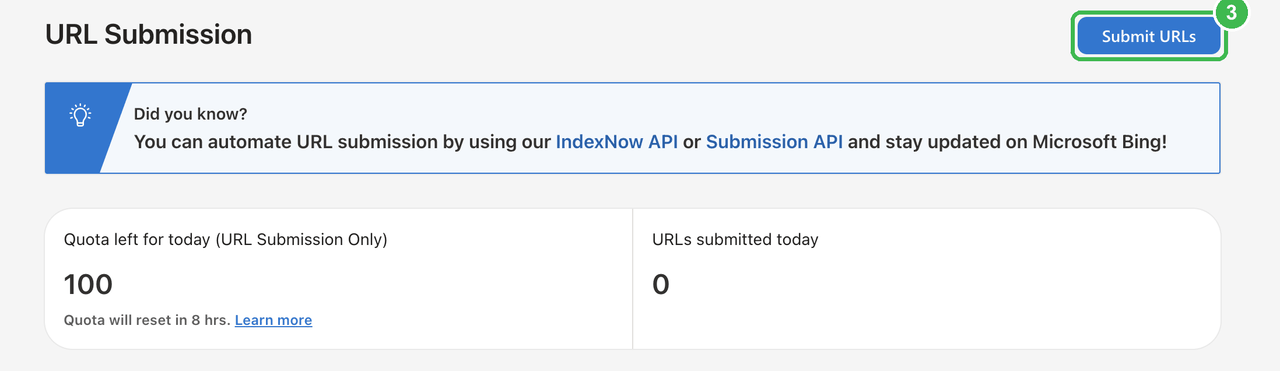
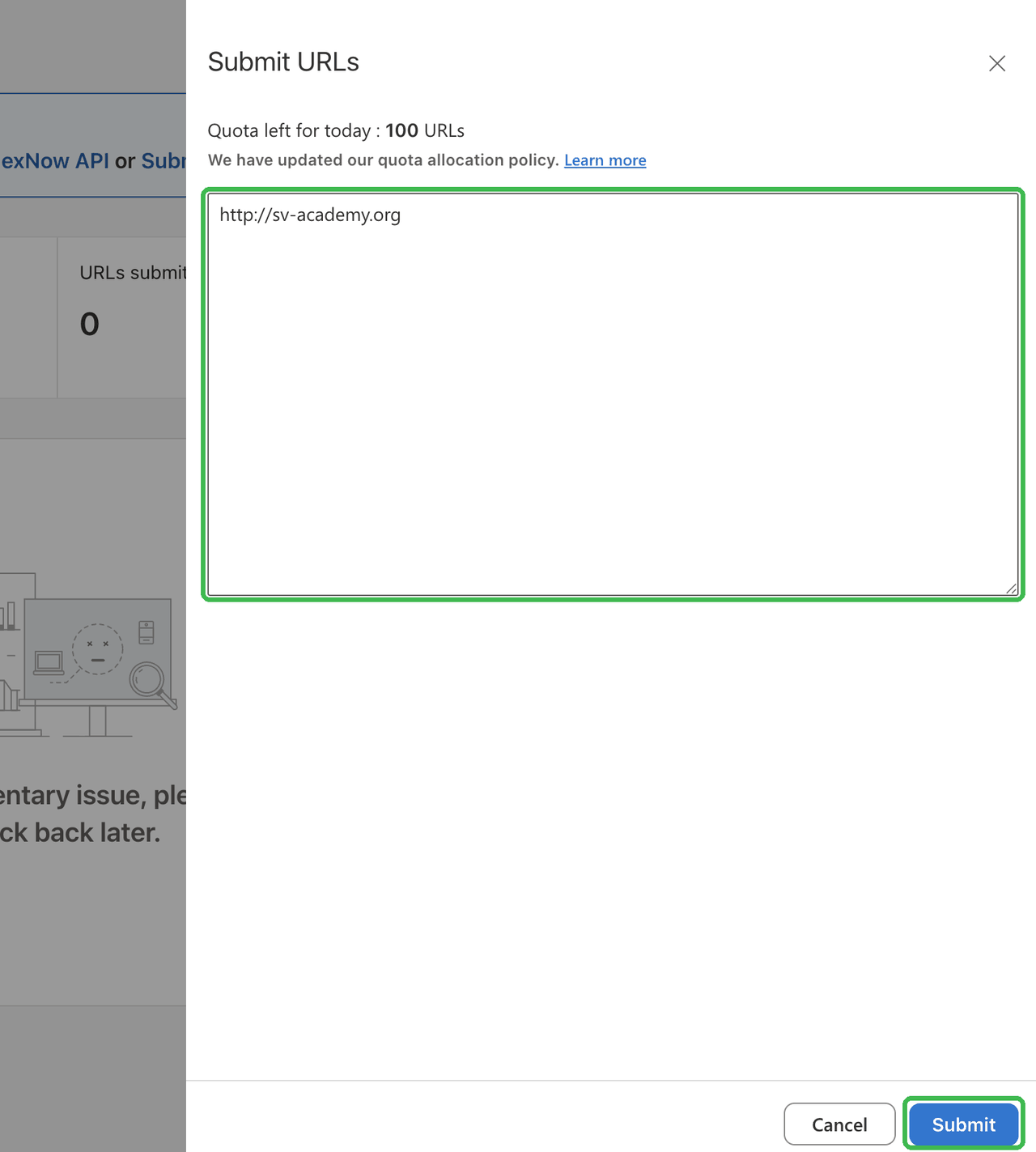
https:// in front.หน้าจอจริง ในช่องเป็นที่อยู่ตัวอย่าง ให้วางของคุณเอง โดยมี https:// นำหน้าYour site is not in the import list?เว็บของคุณไม่อยู่ในรายการ import ใช่ไหม
Then add it by hand. Choose "Add your site manually", enter your full address, pick HTML Meta Tag, paste that tag into the box below, give the prompt to Claude, then press Verify in Bing and submit sitemap.xml under Sitemaps, with your own site selected at the top.
ถ้าไม่อยู่จริง ให้เพิ่มเอง เลือก "Add your site manually" ใส่ที่อยู่เว็บแบบเต็ม เลือก HTML Meta Tag วาง tag ลงในช่องด้านล่าง ส่ง prompt ให้ Claude แล้วกด Verify ใน Bing และ submit sitemap.xml ที่เมนู Sitemaps โดยเช็คว่าเว็บที่เลือกด้านบนคือของคุณ
Ping Bing directly with IndexNowสะกิด Bing ตรงๆ ด้วย IndexNow
This page made you a private key. Claude puts it on your site, then you open one link to tell Bing "this page is new", and that one ping reaches every participating engine (Bing, Yandex, Naver, Seznam.cz, Yep, Amazon). The key file sits at the root of your own address, not on sv-academy.org: hosting it there is the proof that the site is yours. No DNS, no domain owner.หน้านี้สร้าง key ส่วนตัวให้คุณแล้ว Claude จะเอาไปวางบนเว็บ จากนั้นคุณเปิดลิงก์เดียวเพื่อบอก Bing ว่า "หน้านี้มาใหม่" และ ping ครั้งเดียวก็ถึงทุกเจ้าที่ร่วมโปรโตคอลนี้ (Bing, Yandex, Naver, Seznam.cz, Yep, Amazon) ไฟล์ key อยู่ที่ root ของ ที่อยู่ของคุณเอง ไม่ใช่บน sv-academy.org การที่ไฟล์นี้อยู่บน host ของคุณ คือหลักฐานว่าเว็บนี้เป็นของคุณ ไม่ต้องยุ่งกับ DNS ไม่ต้องพึ่งเจ้าของโดเมน
After the deploy, open the key file first. When it shows your key, press Notify.หลัง deploy ให้เปิดไฟล์ key ก่อน ถ้าเห็น key ของคุณแล้วค่อยกด Notify
A blank page or the word OK means it was received. On your very first ping you will probably get 202 instead, which means received, key not checked yet. That is fine. 403 means Bing could not read your key file, so open the key link above again. 422 means the address you sent does not match the host your key file is on. Received is not indexed. To see it landed, open the IndexNow tab in Bing Webmaster Tools. ถ้าขึ้นหน้าว่างหรือคำว่า OK แปลว่ารับแล้ว ping ครั้งแรกส่วนใหญ่จะได้ 202 แปลว่ารับแล้วแต่ยังไม่ได้ตรวจ key ถือว่าปกติ ถ้าได้ 403 แปลว่า Bing อ่านไฟล์ key ไม่เจอ ให้เปิดลิงก์ key ด้านบนใหม่ ถ้าได้ 422 แปลว่าที่อยู่ที่ส่งไปไม่ตรงกับ host ที่ไฟล์ key อยู่ แต่ "รับแล้ว" ไม่ได้แปลว่า "index แล้ว" ถ้าอยากเห็นว่าส่งถึงจริง ให้เปิด tab IndexNow ใน Bing Webmaster Tools
Check what the machines actually seeเช็คว่าเครื่องเห็นเว็บคุณเป็นยังไง
These three work on any public address, so you do not need to be verified. Paste your full address, https and all. ทั้ง 3 ตัวใช้ได้กับที่อยู่เว็บสาธารณะทุกอัน ไม่ต้องยืนยันความเป็นเจ้าของเว็บก่อน วางที่อยู่เว็บแบบเต็ม มี https:// นำหน้าด้วย
Any red error? Copy the error text and send it to Claude with this.มี error สีแดงไหม ถ้ามีให้ copy ข้อความ error แล้วส่งให้ Claude พร้อม prompt นี้
This week: measure, then come back with dataสัปดาห์นี้: วัดผล แล้วเอาข้อมูลกลับมา
Google's own answer: crawling a new address takes a few days to a few weeks, and indexing after that usually takes about a day but can take much longer. Google never promises to index every page, and Search Console's charts need a few days of their own, so an empty report tomorrow is not a mistake. Once a day, press these two.คำตอบจาก Google เอง การ crawl ที่อยู่ใหม่ใช้เวลาไม่กี่วันถึงไม่กี่สัปดาห์ หลังจากนั้นการ index มักใช้เวลาราวหนึ่งวัน แต่อาจนานกว่านั้นมาก Google ไม่เคยรับประกันว่าจะ index ทุกหน้า และกว่ากราฟใน Search Console จะมีข้อมูลก็ต้องรออีกหลายวัน ถ้าพรุ่งนี้เปิดรายงานแล้วยังว่างอยู่ ก็ไม่ได้แปลว่าคุณทำอะไรผิด กด 2 ปุ่มนี้วันละครั้ง
Then ask ChatGPT and Perplexity one question a real customer would ask, and screenshot the answer, mentioned or not. On Day 2 we open Search Console together and read what happened.จากนั้นลองถาม ChatGPT และ Perplexity ด้วยคำถามที่ลูกค้าจริงจะถาม แล้ว screenshot คำตอบไว้ ไม่ว่าจะพูดถึงคุณหรือไม่ Day 2 เราจะเปิด Search Console ดูผลด้วยกัน
Prefer Claude to walk you through it?อยากให้ Claude พาทำทีละขั้น?
The same workflow is a Claude Code skill. Install it once, then type /sv-seo-aeo in any project.workflow เดียวกันนี้มีเป็น skill ของ Claude Code ติดตั้งครั้งเดียว แล้วพิมพ์ /sv-seo-aeo ในโปรเจกต์ไหนก็ได้
Install the sv-seo-aeo skill from github.com/sva-admin/sv-seo-aeo
Building an internal tool? Require sign-in.ทำระบบใช้ภายใน? ต้องให้ลงชื่อเข้าใช้ก่อน
Customer data in a booking board, stock list or clinic dashboard needs access controls. Require sign-in and check each person's permission on the server before returning data. Keep your public landing page indexable. robots.txt and noindex only guide search engines; they do not protect private data.ข้อมูลลูกค้าในตารางจองคิว รายการสต็อก หรือ dashboard คลินิก ต้องมีระบบจำกัดสิทธิ์ ให้ลงชื่อเข้าใช้และตรวจสิทธิ์ของแต่ละคนที่ server ก่อนส่งข้อมูล ส่วน landing page สาธารณะให้ค้นหาเจอได้ตามปกติ robots.txt และ noindex เป็นแค่คำสั่งสำหรับ search engine ไม่ได้ป้องกันข้อมูลส่วนตัว